Converter Studio for WordPress
Lighter images and videos that play everywhere, right in your Media Library. The free plugin makes AVIF and WebP copies, compresses your JPEG and PNG files and turns HEIC photos into JPEG, with no limits and no account.
Pro adds iPhone video to MP4 and conversion in the background. It comes with the converter.studio Pro and Premium plans, for any number of sites.
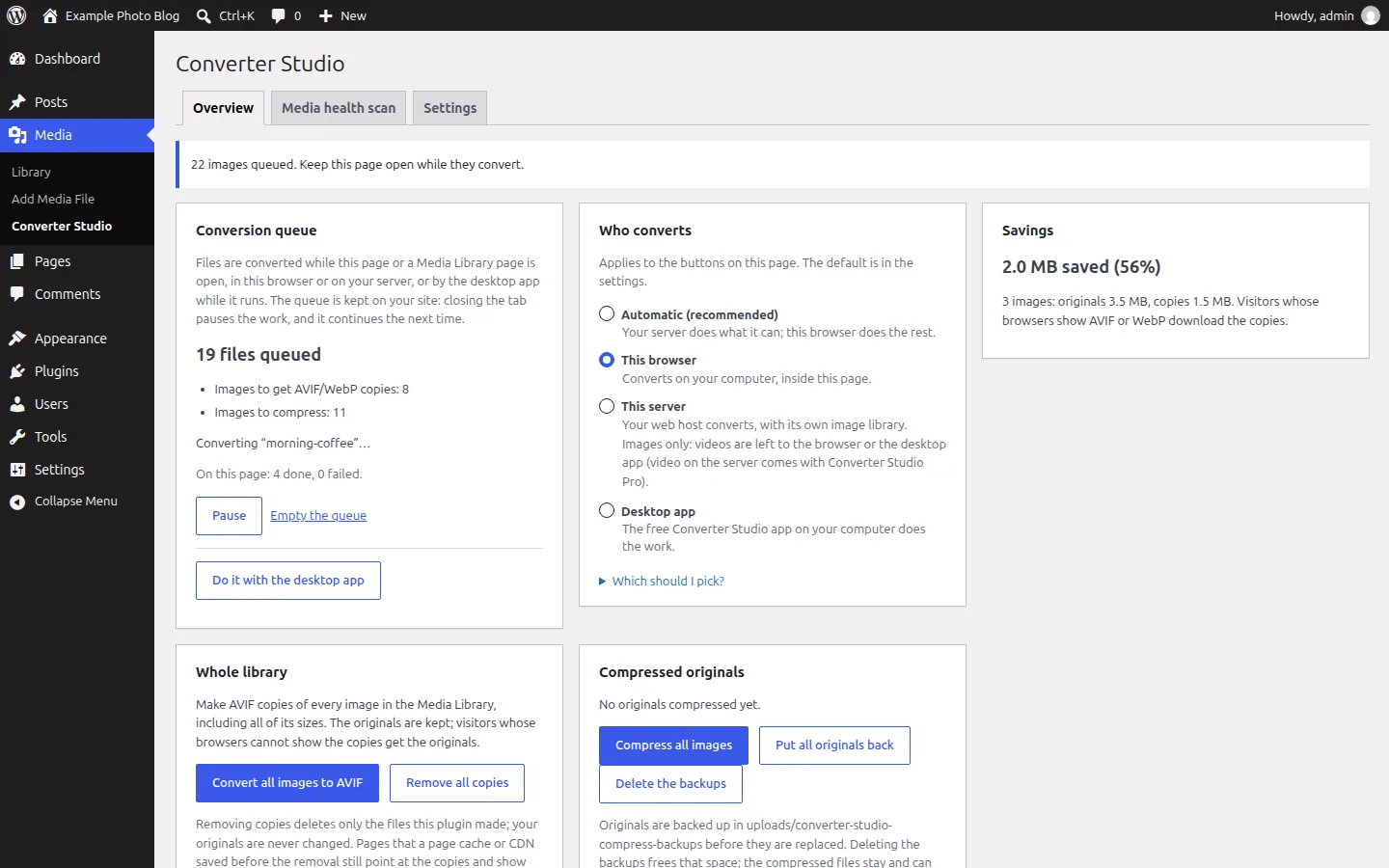
The free plugin: unlimited, no account
Free to download and use. It has no quota, needs no account and makes no requests to other servers, so your files stay on your site.
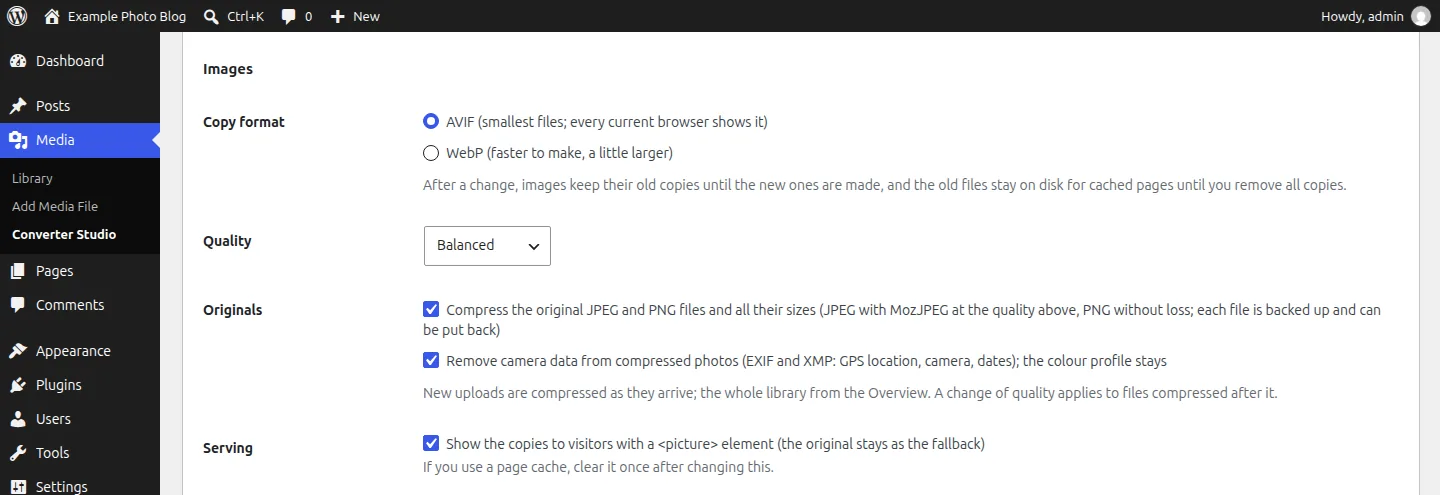
AVIF and WebP for every image size
Copies of the full size and every sub-size, for the library you have and for new uploads. They are served with an HTML picture element, so browsers that can't show them get the original.Smaller JPEG and PNG originals
If you choose to, JPEGs are compressed again with MozJPEG and PNGs are made smaller without any loss with OxiPNG, all their sizes included. Every file is backed up first and can be put back; camera data and GPS location are removed by default.HEIC photos to JPEG
Photos from an iPhone that most browsers can't show become JPEGs.Poster images for videos
Videos get a still image that shows before they play, instead of an empty frame.Media health scan
Lists the files that cause trouble on the web: HEIC photos, iPhone videos, oversized images, big GIFs, images without AVIF or WebP copies and videos without a poster. It only reads your database.Your browser, your server or the desktop app
Choose who does the work: your browser, your own server with its image library (GD or Imagick), or the free Converter Studio app for Windows, macOS and Linux. It works on any hosting.Office documents to PDF
Word, Excel and PowerPoint files get a PDF version through the desktop app.
What Converter Studio Pro adds
A separate plugin that you download from your converter.studio account and install next to the free one, on as many sites as you like. It comes with the Pro and Premium plans.
iPhone video to MP4
MOV and HEVC videos become H.264 MP4 with AAC sound and a poster, at up to 1080p and sized to fit your upload limit. In the browser before the upload or for the videos already in your library, with the desktop app (any video, 4K and HEVC included), on your server with ffmpeg, or on converter.studio's servers.
WordPress & WooCommerce Video ConverterConversion in the background
With your server or converter.studio as the engine, uploads are converted by WP-Cron while no admin page is open, including those from apps, forms and other authors.converter.studio as an engine
For what your host can't do: AVIF, HEIC, video and Office to PDF. It uses your plan's credits, 1 for each image with all its sizes and videos by their length, and the files are deleted from our servers after 6 hours.WP-CLI commands
See the queue, queue the library and work through it from the command line or a scheduled job.Updates from converter.studio
Pro updates from the Plugins page like any other plugin.
Free and Pro side by side
| Feature | Free | Pro |
|---|---|---|
| AVIF or WebP copies of every image size, served with a picture element | Included | Included |
| Compression of JPEG and PNG originals (MozJPEG, lossless OxiPNG), with backups | Included | Included |
| HEIC photos to JPEG | Included | Included |
| Poster images for videos | Included | Included |
| Media health scan | Included | Included |
| Your browser, your server (GD or Imagick) or the desktop app | Included | Included |
| Word, Excel and PowerPoint to PDF with the desktop app | Included | Included |
| iPhone, MOV and HEVC video to H.264 MP4 | Not included | Included |
| Conversion in the background with no page open (WP-Cron) | Not included | Included |
| converter.studio as an engine (with credits) | Not included | Included |
| WP-CLI commands | Not included | Included |
| Updates | Free updates | From converter.studio |
| Sites | Any number | Any number |
| Account | Not needed | A Pro or Premium plan |
| Price | Free | Included in Pro and Premium |
Plans and prices
The free plugin costs nothing. Converter Studio Pro comes with the converter.studio Pro and Premium plans, together with everything else those plans include.
Free plugin
A ZIP file: upload it in WordPress under Plugins → Add New Plugin → Upload Plugin.
$0
Unlimited, no account
Download the free plugin- AVIF or WebP copies of every image size
- Smaller JPEG and PNG originals, with backups
- HEIC photos to JPEG
- Poster images for videos
- Media health scan
- Office documents to PDF with the desktop app
Pro
Converter Studio Pro with the Pro plan
$7.99 / month
1,100 credits every month
Get Pro- Everything in the free plugin
- iPhone, MOV and HEVC videos to MP4
- Conversion in the background
- converter.studio as an engine, with your credits
- WP-CLI commands and updates from converter.studio
- The desktop app with no size limit
- Any number of sites
Premium
Converter Studio Pro with more credits
$19.99 / month
2,500 credits every month
Get Premium- Everything in Pro, with more credits
- First in the queue
Payments are handled securely by Whop. Prices include VAT. Cancel anytime from your account. Prices are in US dollars; your bank may convert them to your currency.
By buying, you agree to the Terms of Service and the Refund policy.
How to get Pro
- 01
Choose the Pro or Premium plan above.
- 02
Download Converter Studio Pro from your account page and upload it in WordPress under Plugins → Add New Plugin → Upload Plugin, next to the free plugin.
- 03
Create an API key on your account page and paste it in Media → Converter Studio → Settings.
Already on a plan? Download Converter Studio Pro from your account.
iPhone videos on your site?
See how Pro turns MOV and HEVC files into MP4 that plays in every browser, in WooCommerce stores too.
Questions and answers
- Is the free plugin really unlimited?
- Yes. It has no quota, needs no account and makes no requests to other servers. The work is done in your browser, on your own server or by the free desktop app, and your files stay on your site. The optional desktop app has its own free limits for very large files.
- What does Pro add to the free plugin?
- iPhone, MOV and HEVC videos to H.264 MP4 with a poster, conversion in the background with no admin page open, converter.studio as an engine for what your host can't do, WP-CLI commands and updates from converter.studio. Everything in the free plugin stays free.
- How do I get Converter Studio Pro?
- It comes with the converter.studio Pro and Premium plans. Once you have a plan, download it from your account page, upload it in WordPress next to the free plugin and paste an API key from your account in its settings.
- On how many sites can I use it?
- On any number of sites. The free plugin has no limit, and Pro works on every site you connect with your plan's API key.
- Does Pro use credits?
- Only when converter.studio's servers do the work: 1 credit for each image with all its sizes, and videos by their length. Converting in your browser, with the desktop app or on your own server uses no credits.
- Does it work with WooCommerce?
- Yes. It works in the Media Library of any WordPress site, WooCommerce stores included: product photos get AVIF or WebP copies and compression, and with Pro, iPhone product videos become MP4 that plays in every browser. It doesn't change your WooCommerce settings.
- Can I cancel?
- Yes, anytime from your account. Payments are handled securely by Whop.